
One simple budget for your household.
Write down what comes in and goes out. See what’s left until payday. Share it with your partner. No bank login, and nothing reads your accounts.
- 4.4 on the App Store (October 2026)
- Made by one person since 2018
- Free to start
- No bank login
- Shared with your partner
- Payday to payday
- Export anytime
- iPhone, iPad and Android
A minute to start. Seconds a day after that.
No account to create and no bank to connect. Open it and write down the last thing you spent.

1. Write it down
Amount, category, save. Most entries take three taps.

2. Plan your period
Give each category an amount and add your bills. Bills count before they leave your account, so what’s left is honest.

3. Share it
Send your partner a short code, on iPhone or Android. You both add to the same budget and see what changed since you last looked.
Everything a household budget needs. Nothing it doesn’t.
Most of these were asked for in a review or an email.
What’s left, at a glance
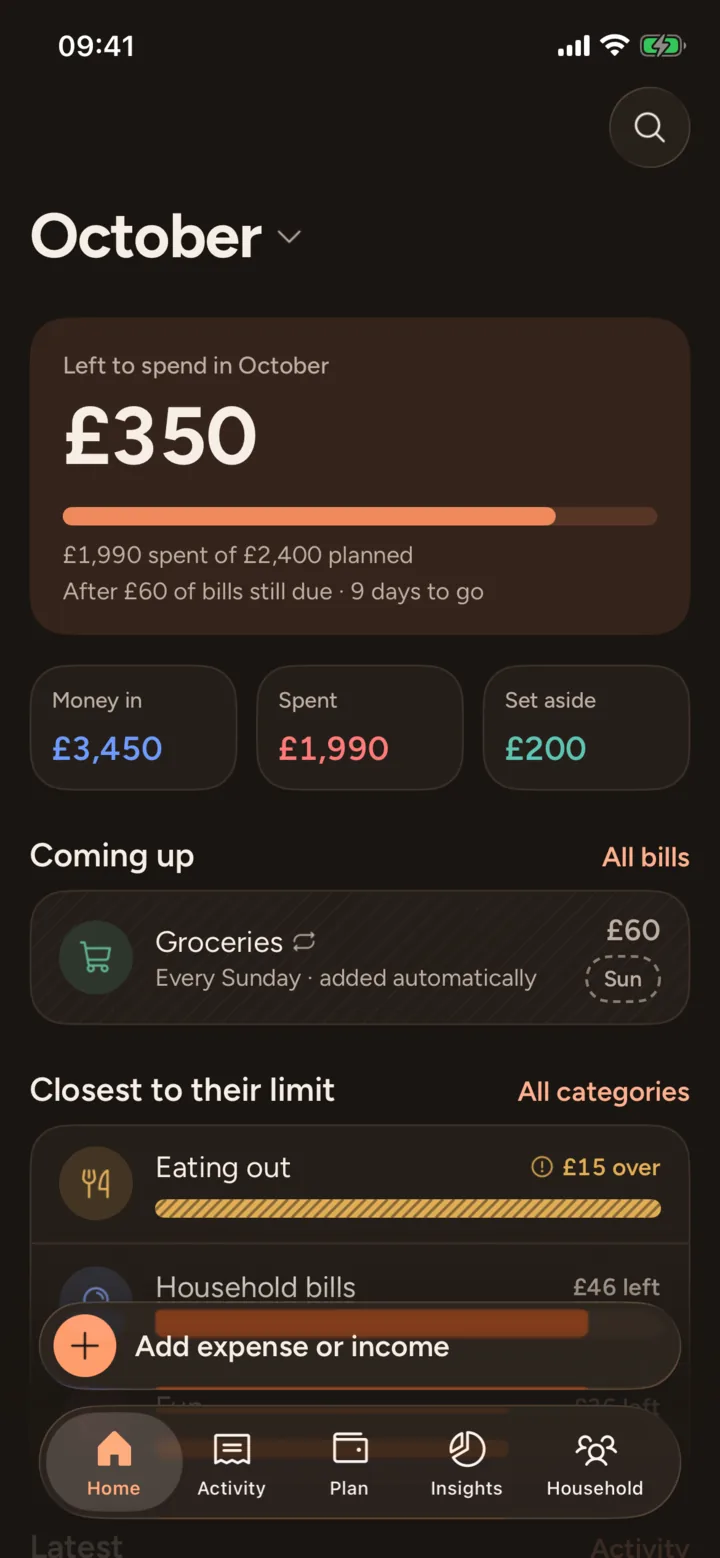
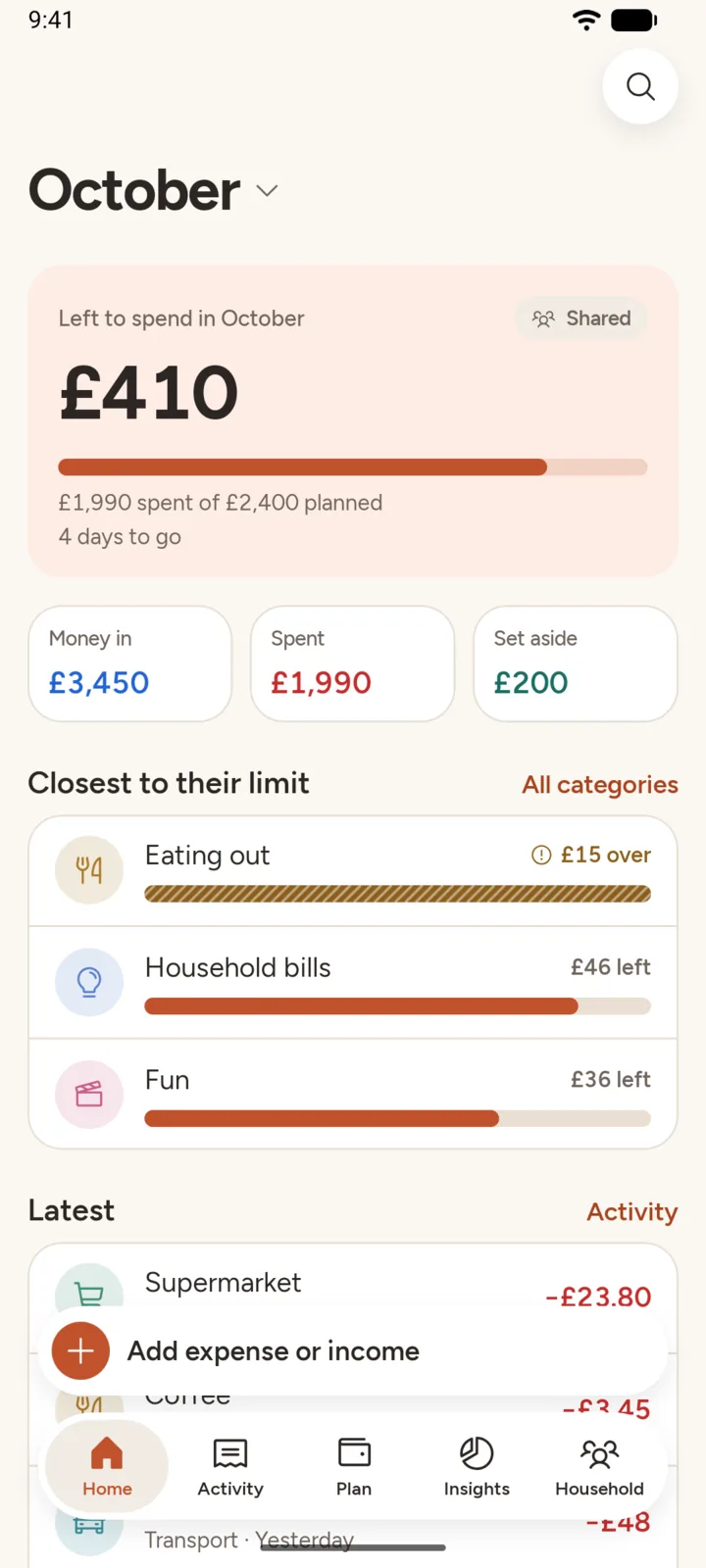
One number on the first screen, and on your Home Screen or Lock Screen with the widget: what you can still spend this period, after the bills still to come.
Payday to payday
Monthly from your payday, every week, fortnightly or four-weekly. Your budget follows your pay.
Asked for in a 2018 review: “a bi-weekly option for those of us who get paid every 2 weeks”.
Bills counted early
Council tax, rent, the TV licence: they’re added for you, count from the start of the period and sort by the day they leave.
A budget per category
Give every category its amount and see what’s left in each, the envelope way, without the envelopes.
Savings kept apart
Money set aside for a goal is never counted as spending. Watch the holiday fund grow.
Asked for in a 2024 review: “separate stats for savings”.
Your data is yours
Export everything to a spreadsheet at any time, on every plan. Never sold and never used for ads.
Also: undo on every change, search, works offline, Face ID lock on iPhone and iPad, Dark Mode and large text.
Writing it down is the point.
Apps that link your bank do the work for you, and that’s why many people stop looking. Typing in what you spent takes a few seconds, and it’s the moment you notice. No bank permissions, nothing breaking when a bank changes its login, and nobody else reading your transactions.
“…it’s too automated for me. Meaning it’s better for me to physically input things to keep track rather than an app that link everything with bank automatically.”

One budget. Two phones. No more arguing over the spreadsheet.
Share your budget with a short code. Everyone adds what they spend and sees the same numbers, whether they’re on iPhone or Android. Anything your partner had entered before is kept aside, not lost. On iPhone and iPad, one Premium subscription covers your household through Apple Family Sharing.
The same budget, on the bigger screen.
On iPad the whole month fits on one screen: what’s left and the bills still to come beside your categories and the latest entries. In Activity, an entry opens next to the list, so tidying up last week takes moments. Sign in with the same email and your iPhone and iPad show the same numbers.


The same budget on Android.
Simple Budget Planner is on Google Play for Android phones and tablets (Android 8.0 or later). It’s the same app, with the same screens, words and numbers. An iPhone and an Android phone can share one budget, so it doesn’t matter which phone your partner has.

What people say
Taken word for word from App Store reviews.
Brilliant!“It’s really turned things around for me. Great that it doesn’t require you to connect a bank account like some apps.”
Nice feature“The Budget sharing feature is great! We use it as a couple to track our family budget easily.”
Excellent, Simple, Functional“As soon as I opened this app, it was easy to use and super functional. Very intuitive. There’s almost no learning curve which is something I appreciated.”
Separate Statistics for Savings“This is very simple yet effective. Highly recommended.”
Free to use. Premium if you want more.
Prices in US dollars. The App Store or Google Play shows the price in your currency before you pay. Cancel any time.
Free
- Every feature
- 40 entries for your household
- Bills and income added for you
- Savings goals
- Share with your household
- Export to CSV
Premium
- No limit on entries
- On iPhone and iPad, covers your household with Family Sharing
- Supports one independent developer
Good questions
Do I need to connect my bank?
No, never. You type in what you spend. There’s no bank login and no access to your accounts.
Do I need an account?
No. Open the app and start. You only add an email when you want to share your budget or move it to a new phone.
How does sharing with my partner work?
In Household, tap “Share this budget”, save it to your email and send the code. Your partner installs the app, taps “I have a code” and types it in. You both see and add to the same budget. Anything they’d entered before is kept aside and comes back if they ever stop sharing.
Can I budget fortnightly or four-weekly?
Yes. Choose every month from your payday, every week, every 2 weeks or every 4 weeks.
What’s free, and what happens after 40 entries?
Every feature is free. The free plan includes 40 entries for your household. After that you can still see, edit and export everything; adding more entries needs Premium.
What happens if I cancel Premium?
Nothing you entered is deleted, and everything stays viewable, editable and exportable. Only adding new entries beyond the free plan needs Premium.
Is there a widget?
Yes. The “Left to spend” widget shows what’s left this period on your Home Screen or Lock Screen, and the larger size has an Add button. You can hide the amounts, or hide them only while your phone is locked, in Household → Settings → Widget.
Can I get my data out?
Yes. Export everything to a CSV spreadsheet from Household → Export, on every plan, at any time.
Where is my data kept?
Your budget syncs through Google Firebase, so it’s on every phone and tablet in your household and comes back on a new one. It’s never sold or used for ads. You can delete your account and everything in it from Settings. See the privacy policy for the details.
Does it work on iPad?
Yes. The same budget runs on iPad, laid out for the bigger screen: what’s left, the bills due and your categories side by side. Sign in with the same email on both and they show the same numbers.
Is it on Android?
Yes. Get it from Google Play, for Android 8.0 or later. It works with the iPhone and iPad app, so one household can mix phones. There’s no web version yet.
Can I move my budget between iPhone and Android?
Yes. On the old phone, open Household and tap “Share this budget” to save your budget to your email. On the new phone, tap “I already use Simple Budget Planner” → “I saved my budget to an email” and sign in. Premium is a subscription with the store you bought it from (App Store or Google Play).
More in Support, or email [email protected].
Budget helpers, no download needed
For the question people ask before they start a budget.

Made by one person, since 2018
Simple Budget Planner started as a way for my wife and me to manage our money. Years and many reviews later, it’s still one person building it, reading every email and every review. Say hello at [email protected]. Mehmet Çetin
Know what’s left before payday.
Free to start. No account, no bank login.